Component Architecture for Velocity
As Faire scaled to 30+ product designers, inconsistent component architecture began slowing everyday workflows. I led the creation of a shared framework, working with designers across the organization to identify friction, validate the approach, and scale it across the library. The result was a predictable system that helped teams move faster and create more consistent customer experiences overall.

ROLE
Product Design Lead
PARTNERS
Design Organization
READ TIME
8 min
01. Context
At the time, both the design systems team and the broader design organization had grown significantly. The design systems team had expanded to three full time designers, while the product design team had grown to more than 30 designers.
What began as a small collection of foundational components had become critical infrastructure used across the company. As adoption increased, so did the importance of helping teams design quickly and consistently.
Adoption of the design system was already very high. More than 87% of product designers used the component library daily, and in a single quarter, designers inserted components more than 400,000 times across product work.
These numbers made one thing clear. Small inefficiencies inside component workflows were no longer isolated inconveniences. They were being repeated hundreds of thousands of times across the organization, creating an opportunity to improve the underlying architecture and remove friction at scale.

Defining the Opportunity
At that point, one of our primary design systems goals was improving team velocity. Having built the library from its earliest versions, I had a unique understanding of how its architecture had evolved over time. Component properties had grown organically as new components were added and new product needs emerged.
Designers could accomplish their tasks, but similar workflows often behaved differently depending on which component they were using. Because designers interacted with component properties so frequently, I believed creating a more predictable workflow could have a meaningful impact on team velocity.
Before committing to a full library refactor, I aligned with the team leads on a phased approach. We agreed to begin with the ten most frequently used components and use them to validate the framework before expanding it across the broader library.

02. Discovery


Validating the Problem
To validate the findings, I spoke with designers across the organization. The feedback was consistent. Designers described having to stop and think about where options lived, how components behaved, and which rules each component followed. They could accomplish what they needed to do, but the experience required more effort than it should have.
More importantly, the feedback confirmed that the problem was not limited to the components I had audited. The friction I identified was being experienced across the broader design organization.
It was also making contributions to the library more difficult because designers did not have a shared framework to follow when creating or improving components.

03. Strategy
The audit and designer interviews revealed that the problem was not simply inconsistency. Designers lacked a predictable mental model for how components worked. Similar concepts were exposed differently across components, making it difficult to transfer knowledge from one workflow to another.
Rather than addressing inconsistencies one component at a time, I focused on creating a shared framework that could improve the entire system. The goal was not consistency for its own sake. It was to create a dependable foundation that product teams could rely on as they designed and scaled new experiences.

Principles
I established three principles to guide the framework and help it scale across the entire library. It needed to be consistent, so similar concepts worked the same way across every component; predictable, so designers did not need to relearn how components worked from one component to the next; and scalable, so it could support future components, not just those that existed at the time.
My goal was for interacting with a component to feel as intuitive as using a well designed product. Designers should be able to predict where options exist, scan quickly, and accomplish tasks without relying on documentation.

04. Framework
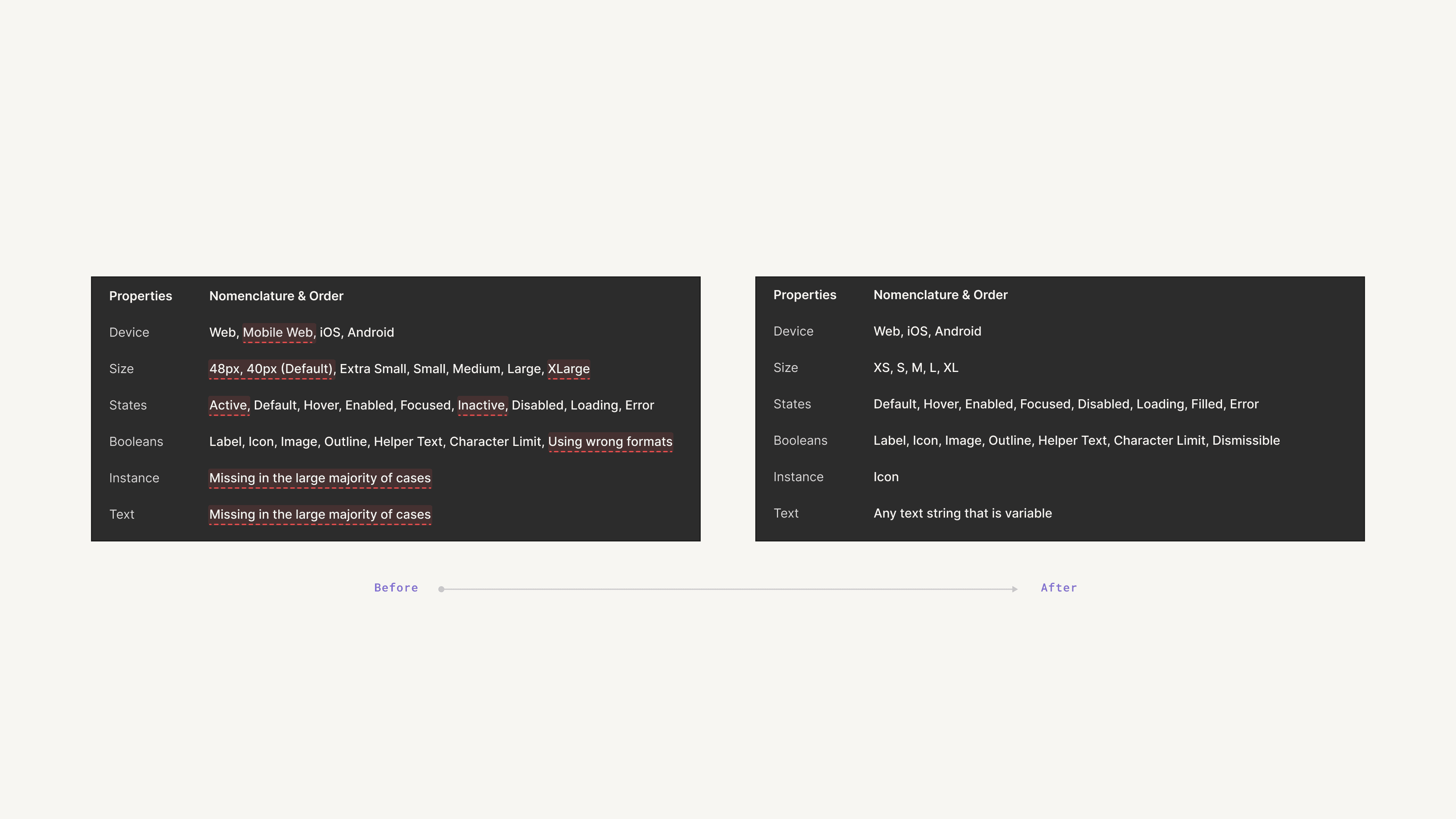
Building on the audit findings, I expanded the analysis across additional components to confirm that the same patterns appeared throughout the library. Six categories consistently emerged: device, size, state, booleans, instances, and text.
Rather than allowing each component to define these categories independently, I used them as the shared foundation for the entire component library. Every component would expose the same concepts through the same structure, making the system easier to learn, use, and scale.
Configuration Order
Interviews and workflow observations revealed that designers followed a consistent sequence when configuring components. They typically started with device, followed by size and state, then moved through configuration options and instances before arriving at content. I organized the framework to reflect how designers already thought and worked.
Faire also had a network of design systems advocates embedded within product teams. These advocates gathered feedback from their teams and brought those insights back to the design systems team, helping us validate that the framework felt intuitive across a wide range of product workflows.
We continued refining the structure until designers could move through component properties naturally, regardless of which component they were using.

Category Rules
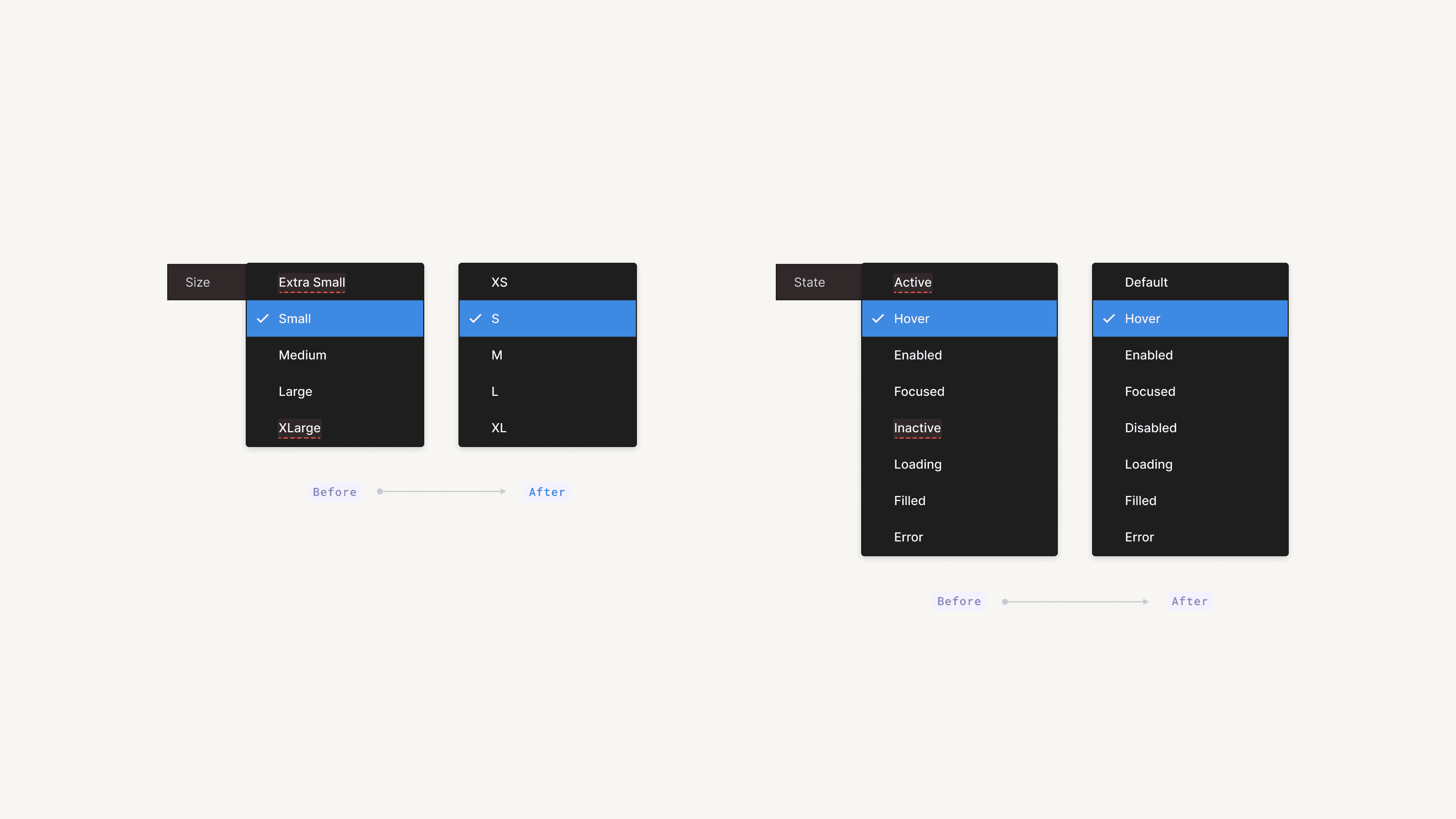
With the framework established, I standardized the rules within each category. Size values were normalized to a single naming convention, while state values followed a shared structure. I also standardized the order in which options appeared: sizes progressed from smallest to largest, and states began with Default because Figma analytics showed it was the most frequently used state.
Individually, these decisions were small. Collectively, they eliminated hundreds of micro decisions that designers encountered throughout the design process. Every component now behaved consistently, making the library easier to scan, learn, and use with confidence.
05. Application
Once the framework was established, I began applying it to the ten most frequently used components identified during the audit. These components represented a large portion of everyday design work, allowing us to validate the framework where it would have the greatest impact.
Inputs were a useful example because they sat at the center of countless product workflows. Whether a merchant was creating a listing, managing inventory, configuring settings, or processing orders, the same underlying concepts appeared throughout the product. Standard inputs, phone number inputs, and measurement inputs all exposed similar concepts while supporting different functionality.
One of the key design decisions was balancing consistency with flexibility. Completely standardizing every input would have simplified the architecture, but it also would have removed functionality teams relied on. Instead, I standardized how shared concepts were represented while preserving the unique behaviors each component required.
Similar concepts now appeared in the same categories, used the same naming conventions, and followed the same ordering. Designers no longer needed to relearn where options lived when switching between components, while component-specific functionality remained intact. The goal was not to make every component behave identically, but to create a predictable mental model without limiting the product problems each component could solve.
The framework also gave designers and the design systems team a shared language for discussing, reviewing, and evolving components over time.


Early Validation
As the first set of components launched, we began gathering feedback from designers across the organization. The early signals were encouraging. Designers reported moving between components more naturally, spending less time searching for options, and adapting quickly to the shared structure.
This validated one of our core assumptions: once designers learned the framework on one component, that knowledge transferred naturally to the next. It gave us the confidence to continue expanding the framework across the broader component library.

06. Adoption
By this point, the framework had been validated through the initial rollout. To support adoption, I created a playground file that documented the new architecture and gave designers a place to explore the framework in practice. I also hosted learning sessions with teams across the organization to walk through the changes and answer questions as they adopted the new structure.
Alongside ongoing conversations with design systems advocates embedded within product teams, these efforts gave us continuous feedback as adoption expanded. Designers were able to transition smoothly, and the early rollout gave us the confidence to continue expanding the framework across the remainder of the component library.
07. Scale
Once established, the framework extended beyond individual components. The same architecture could support larger patterns and complete customer workflows without introducing new complexity.
For example, list items became table rows, table rows combined with table headers, and together they formed complete tables. Components such as tabs, search inputs, and tables also shared the same underlying architecture and interaction patterns.
Because every building block behaved consistently, larger experiences inherited that consistency automatically. Designers could assemble increasingly complex workflows with less overhead and focus on solving product problems instead of relearning how individual components worked. This also made the system easier to extend as new components and product surfaces were introduced.


From Components to Experiences
The real test was whether components could work together seamlessly in the complex patterns that product teams designed and customers experienced every day.
Choice lists could support everything from simple lead time filters to more sophisticated brand selections within a marketplace workflow. Because each component shared the same underlying architecture, designers could combine and extend them without introducing new rules or relearning familiar concepts.
By this point, the framework had proven it could scale from configuring a button to building a table or designing an entire marketplace workflow. As the product evolved, teams could build increasingly sophisticated experiences by extending an architecture they already understood.


A Consistent Foundation
Underneath these experiences, the standardized architecture made components easier to understand and use while preserving the flexibility required for different product needs.
It provided a consistent foundation beneath the surface, allowing individual components to evolve without sacrificing predictability. Designers could confidently work with even the most sophisticated components and focus on solving product problems instead of relearning how each one behaved.
This reduced design overhead, improved consistency across products, and helped the design system scale while keeping the experience intuitive for designers across the organization.

08. Results
Before launching the refactor, we conducted user testing with designers across the organization. In many scenarios, designers were able to configure components in roughly half the time using the new framework.
Following launch, adoption continued to grow. Component usage exceeded one million inserts in a single quarter, while the ten most frequently used components maintained a detachment rate below 5%. This showed that the framework was flexible enough to support real product work without teams breaking away from the system.
What began as a pilot across ten high use components ultimately became the foundation for the broader library. More importantly, teams could build product experiences using shared conventions and mental models instead of relearning each component independently.

09. Takeaway
Looking back, the biggest lesson was that consistency was not the goal itself. The real value came from creating a shared architecture that allowed teams to collaborate more effectively, bring new customer experiences to market faster, and scale the product with confidence.